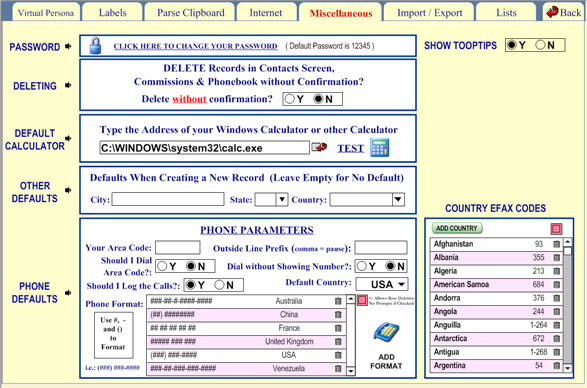
You can change your password here. The software defaults to password 12345 with user ID = User.
You can change the password but not the user ID. If you change the password you will be asked for your password every time you enter the software. If you forget your password, you won't be able to enter the program.
You can also change various dialing parameters here.
For instance, type in your area code and whether you use 10- or 7-digit dialing. This is only if you have your computer's modem set up to dial an outside line.
Also, you can select whether or not you want to have a prompt window when deleting records in the Contacts Screen and other selected places.
You can assign defaults to City, State and Country.
Additionally, you can format the phone numbers and link them to Countries so some countries can have a different format. So for example a phone number in England could be ##### ### ### 12345 789 123 so the format to use would be ##### ### ### for the USA the default format is (###) ####-### but you don't need to program this one because it is already the default.