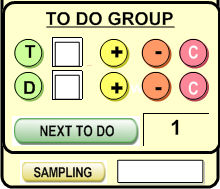
"To Do groups" allow you to easily process various clients. You can choose to process 100 clients one by one, or by sets of X, where X is any number.
To Do groups work exactly like "On-the-Fly groups", and the buttons are exactly analogous (for more information on On-the-Fly groups, see the On-the-Fly Groups help entry).
Once you have
a list of clients with a common trait (such as a "Membership Pending"
attribute), press the  button next to the
  . This will create a (T)o
Do
. This will create a (T)o
Do  group. Then, once an client is processed (such as by
phoning the client and notifying him/her about something), you can choose
to be (D)one with
the current client, and you could mark an "X" next to the circled
group. Then, once an client is processed (such as by
phoning the client and notifying him/her about something), you can choose
to be (D)one with
the current client, and you could mark an "X" next to the circled
 .
.
Also, if you
wish to process client by groups of 2, 3, or more, you can enter a number
into the  field. This will process all the client currently
being viewed and display only 2, 3, etc., at a time.
field. This will process all the client currently
being viewed and display only 2, 3, etc., at a time.
To view the
current batch of clients being processed, you can click on  at
the top navigation bar
at
the top navigation bar
At any moment
you can press the button to select the main group or click
on to select those records already done or to select the next group of X records to interact with.