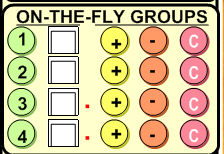
Use "On-the-Fly groups" is an easy way to group clients for viewing purposes.
It allows the user to show and hide clients for easier navigation. Up to 4 On-the-Fly groups can be made.
Here are what the icons do upon clicking them:
 - Displays
the clients who belong to the group.
- Displays
the clients who belong to the group. - Shows
whether the current client is in the group (a check if yes, empty if no).
- Shows
whether the current client is in the group (a check if yes, empty if no). - Adds the current selected found set of clients to the group.
 - Removes current selected found set of clients from the group.
 - Removes all clients from the group. Clears the Group. It untags NOT delete any the records.
For example, if you wish to make an On-the-Fly group of clients whose first names are "John", you would do a find for "John" on the first name field. This would show all clients with the first name John. By clicking on the yellow circle next to, say, group 1, this would create a group of clients whose first name is "John". Then, if you wish to REMOVE all clients with the last name "Smith", do a find for last name "Smith", and click on the orange circle. Now you have in the group only those clients with first name "John" but not those who are "John Smith". If you just wish to add a single client whose name is "Jill Thomas", find her record, and check the box next to the group you wish her to be in. If you wish to remove a group entirely, click on the red circle next to the group number.
On-the-Fly groups don't delete clients or client information. They organize clients for quick viewing and sorting.