Miscellaneous
Program Facts
The more you
use the program, the more confident you will feel and the more you will
realize how simple the program is.
Here are some
miscellaneous tips and facts about the program:
--You do not
need to save at any point. Saving is automatic and up-to-the-second.
--It uses different colors to symbolize the level of awareness that the
user should have to use certain buttons. For example, items in GREEN are pretty much safe to click.
YELLOW and ORANGE
items need more awareness; RED
needs the most awareness. Generally, YELLOW
through RED items
are reserved for deleting, modifying, or removing, but not always.
--Please take the time to read this HELP in its entirety.
--Pressing Control and minus sign ( - ) will insert the date.
--Pressing
Control and semicolon ( ; ) will insert the time.
--Typing a
number into the "Phone" field on the contacts screen will automatically
format to (###) ###-####. You can also add notes, such as "55555
55555 Only
call during 7-9 PM.", and once you leave the field, the program will
display only "(555) 555-5555". Additionally, you can add text
after a phone number like an extension or even a description of use without
interfering with the number.
--All labels
that are squared, have no action. They are just used to describe the field.
Some labels have "rounded corners"; these perform actions (for
example, clicking on the label  will open up the Find Dialog)
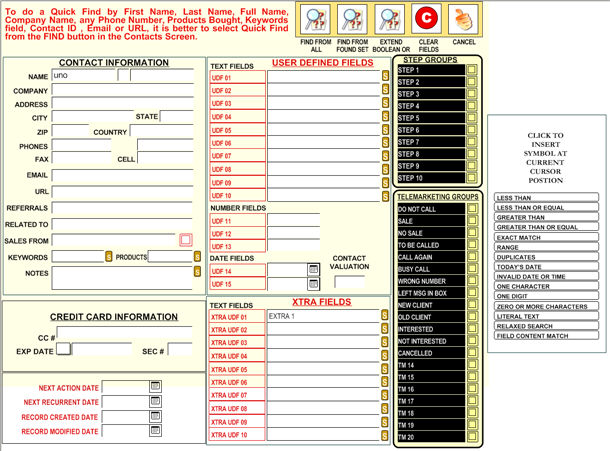
--When using the  command, you will be show either QUICK
FIND or FULL FIND. To use QUICK FIND, just type in a word and click enter,
it will look into the First Name, Last Name, Company Name, all
Phone Numbers, Email, URL, Contact ID, Keywords or Products Code.
command, you will be show either QUICK
FIND or FULL FIND. To use QUICK FIND, just type in a word and click enter,
it will look into the First Name, Last Name, Company Name, all
Phone Numbers, Email, URL, Contact ID, Keywords or Products Code.
In FULL FIND
you can
use a boolean logic by clicking  for a second, third, etc.
request, which is equivalent to a boolean "OR". Also you can
choose to filter from only previously selected records by clicking
for a second, third, etc.
request, which is equivalent to a boolean "OR". Also you can
choose to filter from only previously selected records by clicking  .
.