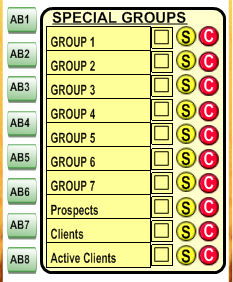
The Special Group is shown below  on the upper right corner, and is only shown when set to
"ADVANCED".
on the upper right corner, and is only shown when set to
"ADVANCED".
To define the labels of this group go to the Setup section.
When viewing a client's record, you can check and uncheck a filter by clicking on the box to the right of the appropriate filter.
If later you wish to filter out all the clients with a particular trait, simply click on the name of the filter.
These fields are ideal to control steps in a process. For example if a particular task requires 5 steps you might want to label them appropriately and then tag the steps that are pending.
For example, after invoicing a client you might need to mail the invoice, then call him, then send the package etc. Probably your first 3 labels would be "Mail Invoice", "Call Client" and "Send Package"
By checking these three steps you will know that there are pending and by clicking on any of them, you will select the records that have this step pending. Very useful