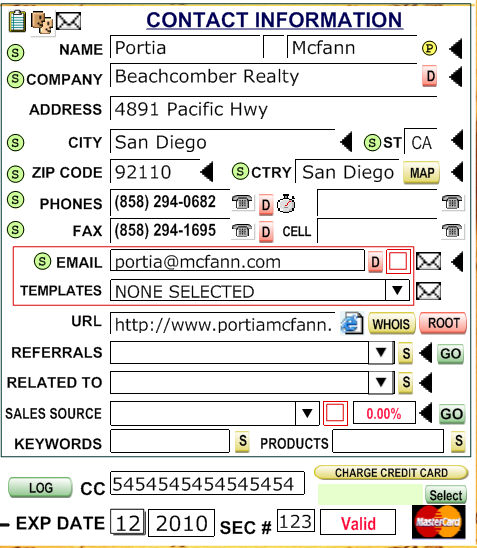
To the right of most fields under Contact Information, you will see some kind of icon. Here are what the icons do upon clicking them:
 - The "two faces" next to the "Name"
field duplicates the current record.
- The "two faces" next to the "Name"
field duplicates the current record. - copies
the client's
basic information to the clipboard.a
- copies
the client's
basic information to the clipboard.a - click the envelope to export
and send, as an email attachment, the current contact or selected contacts.
- click the envelope to export
and send, as an email attachment, the current contact or selected contacts. Changes the name to a Proper
format.
Changes the name to a Proper
format. - The program will filter
by the field to the left of the arrow. If you are viewing an affiliate
who lives in NY, and you click the triangle next to NY, all affiliates
who live in NY will be displayed and those living elsewhere will be hidden.
Use the navigation bar to choose between your clients or use the Find
option.
- The program will filter
by the field to the left of the arrow. If you are viewing an affiliate
who lives in NY, and you click the triangle next to NY, all affiliates
who live in NY will be displayed and those living elsewhere will be hidden.
Use the navigation bar to choose between your clients or use the Find
option. Inserts a snippet to the current field.
For more information on snippets, see the Snippets Help entry.
Inserts a snippet to the current field.
For more information on snippets, see the Snippets Help entry. When you click this button your default
Internet browser will open and it will try to find a map with the address
of this contact.
When you click this button your default
Internet browser will open and it will try to find a map with the address
of this contact. - The telephone icon will dial up the selected
affiliate. This works when your computer and modem are configured for
dialing with TAPI
.
- The telephone icon will dial up the selected
affiliate. This works when your computer and modem are configured for
dialing with TAPI
. - The
envelope icon will open an e-mail addressed to the selected affiliate.
When clicking the icon next to the client's e-mail address, a blank e-mail
will be created. When clicking the icon next to "Selected",
an e-mail with a template e-mail will be made. To create a template e-mail,
see the E-mail System help entry.
- The
envelope icon will open an e-mail addressed to the selected affiliate.
When clicking the icon next to the client's e-mail address, a blank e-mail
will be created. When clicking the icon next to "Selected",
an e-mail with a template e-mail will be made. To create a template e-mail,
see the E-mail System help entry. - Opens up the URL with your default Internet browser.
 - Opens up your default Internet browser
to the Whois webpage for the URL of your affiliate.
- Opens up your default Internet browser
to the Whois webpage for the URL of your affiliate. - Opens up the URL with your default Internet
browser, but ignores everything past the ".com/.net/.org" section
of the URL.
- Opens up the URL with your default Internet
browser, but ignores everything past the ".com/.net/.org" section
of the URL. - This
is a very special button. It will find the duplicates from either the
company or the email fields as appropriate. Please notice that the selection
will come from the found set at the that moment. For example if you have
filtered the database by all record in Florida and click on the
- This
is a very special button. It will find the duplicates from either the
company or the email fields as appropriate. Please notice that the selection
will come from the found set at the that moment. For example if you have
filtered the database by all record in Florida and click on the  button beside the company
field, all the duplicates company records ONLY from those previously selected
(those in Florida) will be selected. Evidently, if you want to select
all duplicates them select all records first and then click on the
button beside the company
field, all the duplicates company records ONLY from those previously selected
(those in Florida) will be selected. Evidently, if you want to select
all duplicates them select all records first and then click on the  button.
 .
You will see these action buttons in many places throughout the program.
It acts differently based on the information on the field at its left.
If the field contains a URL, it will open your default Browser, if the
field contains and email it will open your email client, if a program
or document, it will run the program or open the document with the correct
application and if contains a phone number it will open the TAPI system
if installed in
your computer. If it has program oir document address it will open the
document or program. If you precede an URL with GRAB it will "grab"
the webpage and either save it to the hard drive or put in the clipboard.
.
You will see these action buttons in many places throughout the program.
It acts differently based on the information on the field at its left.
If the field contains a URL, it will open your default Browser, if the
field contains and email it will open your email client, if a program
or document, it will run the program or open the document with the correct
application and if contains a phone number it will open the TAPI system
if installed in
your computer. If it has program oir document address it will open the
document or program. If you precede an URL with GRAB it will "grab"
the webpage and either save it to the hard drive or put in the clipboard. . Click
on this button to sort the found records set by the field to the right
of the green dot.
. Click
on this button to sort the found records set by the field to the right
of the green dot.